> ## Documentation Index
> Fetch the complete documentation index at: https://cerebrium-fix-make-entrypoint-docs-explicit.mintlify.site/llms.txt
> Use this file to discover all available pages before exploring further.
# Deploy a Vision Language Model with SGLang
> Build an intelligent ad analysis system that evaluates advertisements across multiple dimensions
In this tutorial, we'll explore how to deploy a Vision Language Model (VLM) using SGLang on Cerebrium. A VLM is an AI model that combines a large language model (LLM) with a vision encoder, allowing it to understand and process both images and text.
We'll build an intelligent ad analysis system that evaluates advertisements across multiple dimensions, giving us a score on how the advertisement relates to the business in quesion and how it scores on the given criteria.
SGLang (Structured Generation Language) differs from other inference frameworks such as vLLM and TensorRT by focusing no structed generation and complex workflows multi-step LLM workflows. SGLang is being used in production by teams at xAI and Deepseek to power their core language model capabilities making it a trusted choice.
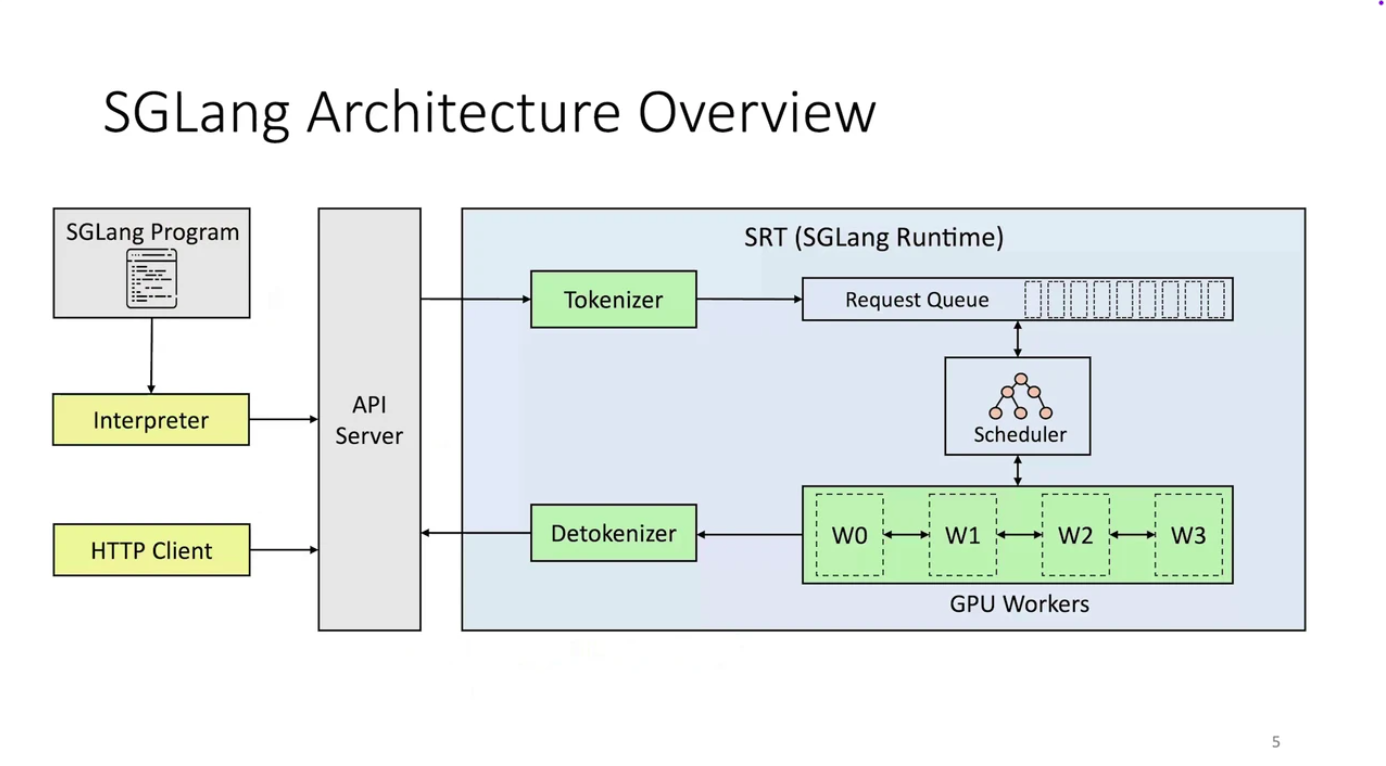
### SGLang Architecture
SGLang isn't just a domain-specific language (DSL). It's a complete, integrated execution system, designed with a clear seperation of functionality:
| Layer | What it does | Why it matters |
| -------- | ------------------------------------------------------------------------------ | --------------------------------------------------------------------------------- |
| Frontend | Where you define your LLM logic (with gen, fork, join, etc.) | This keeps your code clean, readable, and your workflows easily reusable. |
| Backend | Where SGLang intelligently figures out how to run your logic most efficiently. | This is where the speed, scalability, and optimized inference truly come to life. |
To give you quick example, here are some primitives on the frontend you can use to create multi-step workflows:
| Primitive | What it does | Example |
| ---------- | --------------------------------------- | ------------------------------------------ |
| `gen()` | Generates a text span | `gen("title", stop="\n")` |
| `fork()` | Splits execution into multiple branches | For parallel sub-tasks |
| `join()` | Merges branches back together | For combining outputs |
| `select()` | Chooses one option from many | For controlled logic, like multiple choice |
 Here is a summary of key advantages over traditional inference engines
| Feature | Traditional Engines (vLLM, TGI) | SGLang |
| ----------------------- | ------------------------------------------------ | -------------------------------------------------------------------------- |
| **Programming Model** | Sequential API calls with manual prompt chaining | Native structured logic with `gen()`, `fork()`, `join()`, `select()` |
| **Memory Management** | Basic KV caching, often discarded between calls | **RadixAttention**: Intelligent prefix-aware cache reuse (up to 6x faster) |
| **Output Control** | Hope and pray for correct formatting | **Compressed FSMs**: Guaranteed structured output (JSON, XML, etc.) |
| **Parallel Processing** | Manual batching and coordination | Built-in `fork()` and `join()` for parallel execution |
| **Performance** | Standard inference optimization | PyTorch-native with `torch.compile()`, quantization, sparse inference |
If you would like to read more, checkout this [article](https://huggingface.co/blog/paresh2806/sglang-efficient-llm-workflows). Let us show this in practice with our tutorial.
You can see the final code sample [here](https://github.com/CerebriumAI/examples/tree/master/5-large-language-models/7-vision-language-sglang)
## Tutorial
### Step 1: Project Setup
First, let's create our project structure:
```bash theme={null}
cerebrium init 7-vision-language-sglang
cd 7-vision-language-sglang
```
### Step 2: Configure Dependencies
The VLM we will be using is [Qwen3-VL-30B-A3B-Instruct-FP8](https://huggingface.co/Qwen/Qwen3-VL-30B-A3B-Instruct-FP8) model, which need a lot of GPU memory - we configure this in our cerebrium.toml.
Cerebrium runs containers in the cloud and this file defines our environment, hardware, and scaling settings. We'll use an ADA\_L40 GPU to accommodate our model's memory requirements. The configuration includes:
* Hardware settings for GPU, CPU and memory allocation
* Scaling parameters to control instance counts
* Required pip packages like SGLang, flashinfer (our chosen backend), and PyTorch
* APT system dependencies
* FastAPI server configuration for hosting our API
For a complete reference of all available TOML settings, see our [TOML Reference](/toml-reference/toml-reference).
While we use flashinfer as our backend here, other options like flash attention are also available depending on your needs.
Update your cerebrium.toml with:
```toml theme={null}
[deployment]
name = "7-vision-language-sglang"
python_version = "3.11"
docker_base_image_url = "nvidia/cuda:12.8.0-devel-ubuntu22.04"
deployment_initialization_timeout = 860
[hardware]
cpu = 6.0
memory = 60.0
compute = "ADA_L40"
[scaling]
min_replicas = 0
max_replicas = 2
[build]
use_uv = true
[dependencies.pip]
transformers = "latest"
huggingface_hub = "latest"
pydantic = "latest"
pillow = "latest"
requests = "latest"
torch = "latest"
"sglang[all]" = "latest"
"sgl-kernel" = "latest"
"flashinfer-python" = "latest"
[dependencies.apt]
libnuma-dev = "latest"
[runtime.custom]
port = 8000
entrypoint = ["uvicorn", "main:app", "--host", "0.0.0.0", "--port", "8000"]
```
### Step 3: Implement the Ad Analysis Logic
One of the many great features of Cerebrium is we don't enforce any special class design or way of architecing your applications - Just write your python code as if you
were running it locally (and if you had a GPU ;). Below, we setup our SGLang Runtime Engine (Backend) with our FastAPI and load the model on startup of the container. This means we will incur
a model load on the first request but subsequent requests will execute instantaneously.
In your `main.py` file:
```python theme={null}
import sglang as sgl
from sglang import function
from fastapi import FastAPI, HTTPException
from transformers import AutoProcessor
app = FastAPI(title="Vision Language SGLang API")
model_path = "Qwen/Qwen3-VL-30B-A3B-Instruct-FP8"
processor = AutoProcessor.from_pretrained(model_path)
@app.on_event("startup")
def _startup_warmup():
# Initialize engine on main thread during app startup
runtime = sgl.Runtime(
model_path=model_path,
enable_multimodal=True,
mem_fraction_static=0.8,
tp_size=1,
attention_backend="flashinfer",
)
runtime.endpoint.chat_template = sgl.lang.chat_template.get_chat_template(
"qwen2-vl"
)
sgl.set_default_backend(runtime)
@app.get("/health")
def health():
return {
"status": "healthy",
}
```
In order to score the advertisement, we will be using one of the core differentiators of SGLang, `fork`, which allows us to run many prompts in parallel and bring the results together in the end. This
allows us to execute alot of simulaneous requests with no increase in total latency. Lastly, we bring these results together and structure them in a specific format to return to the user.
```python theme={null}
@function
def analyze_ad(s, image, ad_description, dimensions):
s += sgl.system("Evaluate an advertisement about an company's description.")
s += sgl.user(sgl.image(image) + "Company Description: " + ad_description)
s += sgl.assistant("Sure!")
s += sgl.user("Is the company description related to the image?")
s += sgl.assistant(sgl.select("related", choices=["yes", "no"]))
if s["related"] == "no":
return
forks = s.fork(len(dimensions))
for i, (f, dim) in enumerate(zip(forks, dimensions)):
f += sgl.user("Evaluate based on the following dimension: " +
dim + ". End your judgment with the word 'END'")
# Use unique slot names per dimension to avoid collisions
f += sgl.assistant("Judgment: " + sgl.gen(f"judgment_{i}", stop="END"))
s += sgl.user("Provide a one-sentence synthesis of the overall evaluation, then we will output JSON.")
s += sgl.assistant(sgl.gen("summary_one_liner", stop="."))
schema = r'^\{"summary": ".{1,400}", "grade": "[ABCD][+\-]?"\}$'
s += sgl.user("Return only a 3 line parapgrah JSON object with keys summary and grade (A, B, C, D, +, -), where summary briefly synthesizes the above judgments.")
s += sgl.assistant(sgl.gen("output", regex=schema))
```
To end, let us bring it all together in an endpoint and
```python theme={null}
from pydantic import BaseModel
import base64
import io
import json
from PIL import Image
class AnalyzeRequest(BaseModel):
image_base64: str
ad_description: str
dimensions: list
def process_image(image_base64: str) -> Image.Image:
image_data = base64.b64decode(image_base64)
return Image.open(io.BytesIO(image_data))
@app.post("/analyze")
def analyze_advertisement(req: AnalyzeRequest):
try:
image = process_image(req.image_base64)
state = analyze_ad.run(image, req.ad_description, req.dimensions)
try:
print(state)
output = state["output"]
except KeyError:
output = None
if isinstance(output, str):
start = output.find("{")
end = output.rfind("}") + 1
if start != -1 and end > start:
return {
"success": True,
"analysis": json.loads(output[start:end]),
"dimensions_evaluated": req.dimensions
}
return {
"success": True,
"analysis": output,
"dimensions_evaluated": req.dimensions
}
except Exception as e:
raise HTTPException(status_code=500, detail=str(e))
```
Thats it! Let's deploy your application so it becomes a scalable inference endpoint
### Step 4: Deploy Your Application
Run:
```bash theme={null}
cerebrium deploy
```
Once deployed, test your application with a sample request:
```bash theme={null}
curl -X POST "https://api.aws.us-east-1.cerebrium.ai/v4/p-/7-vision-language-sglang/analyze" \
-H "Content-Type: application/json" \
-d '{
"company_description": "Nike is a global leader in athletic footwear, apparel, and sports equipment known for its innovative designs and the iconic “swoosh” logo. The brand embodies performance, style, and inspiration, empowering athletes worldwide to Just Do It."",
"image_base64": "",
"dimensions": ["Effectiveness","Clarity", "Appeal","Credibility"]
}'
```
Here is a summary of key advantages over traditional inference engines
| Feature | Traditional Engines (vLLM, TGI) | SGLang |
| ----------------------- | ------------------------------------------------ | -------------------------------------------------------------------------- |
| **Programming Model** | Sequential API calls with manual prompt chaining | Native structured logic with `gen()`, `fork()`, `join()`, `select()` |
| **Memory Management** | Basic KV caching, often discarded between calls | **RadixAttention**: Intelligent prefix-aware cache reuse (up to 6x faster) |
| **Output Control** | Hope and pray for correct formatting | **Compressed FSMs**: Guaranteed structured output (JSON, XML, etc.) |
| **Parallel Processing** | Manual batching and coordination | Built-in `fork()` and `join()` for parallel execution |
| **Performance** | Standard inference optimization | PyTorch-native with `torch.compile()`, quantization, sparse inference |
If you would like to read more, checkout this [article](https://huggingface.co/blog/paresh2806/sglang-efficient-llm-workflows). Let us show this in practice with our tutorial.
You can see the final code sample [here](https://github.com/CerebriumAI/examples/tree/master/5-large-language-models/7-vision-language-sglang)
## Tutorial
### Step 1: Project Setup
First, let's create our project structure:
```bash theme={null}
cerebrium init 7-vision-language-sglang
cd 7-vision-language-sglang
```
### Step 2: Configure Dependencies
The VLM we will be using is [Qwen3-VL-30B-A3B-Instruct-FP8](https://huggingface.co/Qwen/Qwen3-VL-30B-A3B-Instruct-FP8) model, which need a lot of GPU memory - we configure this in our cerebrium.toml.
Cerebrium runs containers in the cloud and this file defines our environment, hardware, and scaling settings. We'll use an ADA\_L40 GPU to accommodate our model's memory requirements. The configuration includes:
* Hardware settings for GPU, CPU and memory allocation
* Scaling parameters to control instance counts
* Required pip packages like SGLang, flashinfer (our chosen backend), and PyTorch
* APT system dependencies
* FastAPI server configuration for hosting our API
For a complete reference of all available TOML settings, see our [TOML Reference](/toml-reference/toml-reference).
While we use flashinfer as our backend here, other options like flash attention are also available depending on your needs.
Update your cerebrium.toml with:
```toml theme={null}
[deployment]
name = "7-vision-language-sglang"
python_version = "3.11"
docker_base_image_url = "nvidia/cuda:12.8.0-devel-ubuntu22.04"
deployment_initialization_timeout = 860
[hardware]
cpu = 6.0
memory = 60.0
compute = "ADA_L40"
[scaling]
min_replicas = 0
max_replicas = 2
[build]
use_uv = true
[dependencies.pip]
transformers = "latest"
huggingface_hub = "latest"
pydantic = "latest"
pillow = "latest"
requests = "latest"
torch = "latest"
"sglang[all]" = "latest"
"sgl-kernel" = "latest"
"flashinfer-python" = "latest"
[dependencies.apt]
libnuma-dev = "latest"
[runtime.custom]
port = 8000
entrypoint = ["uvicorn", "main:app", "--host", "0.0.0.0", "--port", "8000"]
```
### Step 3: Implement the Ad Analysis Logic
One of the many great features of Cerebrium is we don't enforce any special class design or way of architecing your applications - Just write your python code as if you
were running it locally (and if you had a GPU ;). Below, we setup our SGLang Runtime Engine (Backend) with our FastAPI and load the model on startup of the container. This means we will incur
a model load on the first request but subsequent requests will execute instantaneously.
In your `main.py` file:
```python theme={null}
import sglang as sgl
from sglang import function
from fastapi import FastAPI, HTTPException
from transformers import AutoProcessor
app = FastAPI(title="Vision Language SGLang API")
model_path = "Qwen/Qwen3-VL-30B-A3B-Instruct-FP8"
processor = AutoProcessor.from_pretrained(model_path)
@app.on_event("startup")
def _startup_warmup():
# Initialize engine on main thread during app startup
runtime = sgl.Runtime(
model_path=model_path,
enable_multimodal=True,
mem_fraction_static=0.8,
tp_size=1,
attention_backend="flashinfer",
)
runtime.endpoint.chat_template = sgl.lang.chat_template.get_chat_template(
"qwen2-vl"
)
sgl.set_default_backend(runtime)
@app.get("/health")
def health():
return {
"status": "healthy",
}
```
In order to score the advertisement, we will be using one of the core differentiators of SGLang, `fork`, which allows us to run many prompts in parallel and bring the results together in the end. This
allows us to execute alot of simulaneous requests with no increase in total latency. Lastly, we bring these results together and structure them in a specific format to return to the user.
```python theme={null}
@function
def analyze_ad(s, image, ad_description, dimensions):
s += sgl.system("Evaluate an advertisement about an company's description.")
s += sgl.user(sgl.image(image) + "Company Description: " + ad_description)
s += sgl.assistant("Sure!")
s += sgl.user("Is the company description related to the image?")
s += sgl.assistant(sgl.select("related", choices=["yes", "no"]))
if s["related"] == "no":
return
forks = s.fork(len(dimensions))
for i, (f, dim) in enumerate(zip(forks, dimensions)):
f += sgl.user("Evaluate based on the following dimension: " +
dim + ". End your judgment with the word 'END'")
# Use unique slot names per dimension to avoid collisions
f += sgl.assistant("Judgment: " + sgl.gen(f"judgment_{i}", stop="END"))
s += sgl.user("Provide a one-sentence synthesis of the overall evaluation, then we will output JSON.")
s += sgl.assistant(sgl.gen("summary_one_liner", stop="."))
schema = r'^\{"summary": ".{1,400}", "grade": "[ABCD][+\-]?"\}$'
s += sgl.user("Return only a 3 line parapgrah JSON object with keys summary and grade (A, B, C, D, +, -), where summary briefly synthesizes the above judgments.")
s += sgl.assistant(sgl.gen("output", regex=schema))
```
To end, let us bring it all together in an endpoint and
```python theme={null}
from pydantic import BaseModel
import base64
import io
import json
from PIL import Image
class AnalyzeRequest(BaseModel):
image_base64: str
ad_description: str
dimensions: list
def process_image(image_base64: str) -> Image.Image:
image_data = base64.b64decode(image_base64)
return Image.open(io.BytesIO(image_data))
@app.post("/analyze")
def analyze_advertisement(req: AnalyzeRequest):
try:
image = process_image(req.image_base64)
state = analyze_ad.run(image, req.ad_description, req.dimensions)
try:
print(state)
output = state["output"]
except KeyError:
output = None
if isinstance(output, str):
start = output.find("{")
end = output.rfind("}") + 1
if start != -1 and end > start:
return {
"success": True,
"analysis": json.loads(output[start:end]),
"dimensions_evaluated": req.dimensions
}
return {
"success": True,
"analysis": output,
"dimensions_evaluated": req.dimensions
}
except Exception as e:
raise HTTPException(status_code=500, detail=str(e))
```
Thats it! Let's deploy your application so it becomes a scalable inference endpoint
### Step 4: Deploy Your Application
Run:
```bash theme={null}
cerebrium deploy
```
Once deployed, test your application with a sample request:
```bash theme={null}
curl -X POST "https://api.aws.us-east-1.cerebrium.ai/v4/p-/7-vision-language-sglang/analyze" \
-H "Content-Type: application/json" \
-d '{
"company_description": "Nike is a global leader in athletic footwear, apparel, and sports equipment known for its innovative designs and the iconic “swoosh” logo. The brand embodies performance, style, and inspiration, empowering athletes worldwide to Just Do It."",
"image_base64": "",
"dimensions": ["Effectiveness","Clarity", "Appeal","Credibility"]
}'
```
 ### Example Response
```json theme={null}
{
"success": true,
"analysis": {
"summary": "The company description is relevant to the image because it accurately reflects Nike's branding, which is showcased through the advertised sneaker and logo. The ad promotes Nike's core products—athletic footwear—and its values of performance, style, and inspiration, aligning with the brand's identity. The collaboration with a superhero theme further emphasizes innovation and empowerment, core ",
"grade": "A"
},
"dimensions_evaluated": ["Effectiveness", "Clarity", "Appeal", "Credibility"]
}
```
We've demonstrated a simple application how to leverage SGLang's powerful structured generation capabilities to build a naive ad analysis system. By using features like `fork()` for parallel processing and SGLang's built-in output control.
You can find the complete code for this tutorial in our [examples repository](https://github.com/CerebriumAI/examples/tree/master/5-large-language-models/7-vision-language-sglang).
```
```
### Example Response
```json theme={null}
{
"success": true,
"analysis": {
"summary": "The company description is relevant to the image because it accurately reflects Nike's branding, which is showcased through the advertised sneaker and logo. The ad promotes Nike's core products—athletic footwear—and its values of performance, style, and inspiration, aligning with the brand's identity. The collaboration with a superhero theme further emphasizes innovation and empowerment, core ",
"grade": "A"
},
"dimensions_evaluated": ["Effectiveness", "Clarity", "Appeal", "Credibility"]
}
```
We've demonstrated a simple application how to leverage SGLang's powerful structured generation capabilities to build a naive ad analysis system. By using features like `fork()` for parallel processing and SGLang's built-in output control.
You can find the complete code for this tutorial in our [examples repository](https://github.com/CerebriumAI/examples/tree/master/5-large-language-models/7-vision-language-sglang).
```
```